Introduction Intrusion Detection System - Linux
In this guide, you'll discover step by step how to install and configure an intrusion detection system on your Linux machine, protecting against unauthorized threats.
What is and how it works
This utility provides a reliable way to spot tampered files on your Linux system. Because the kernel does not automatically flag every modification you make especially subtle changes to binaries or kernel modules. This script fills that gap by continuously monitoring file integrity.
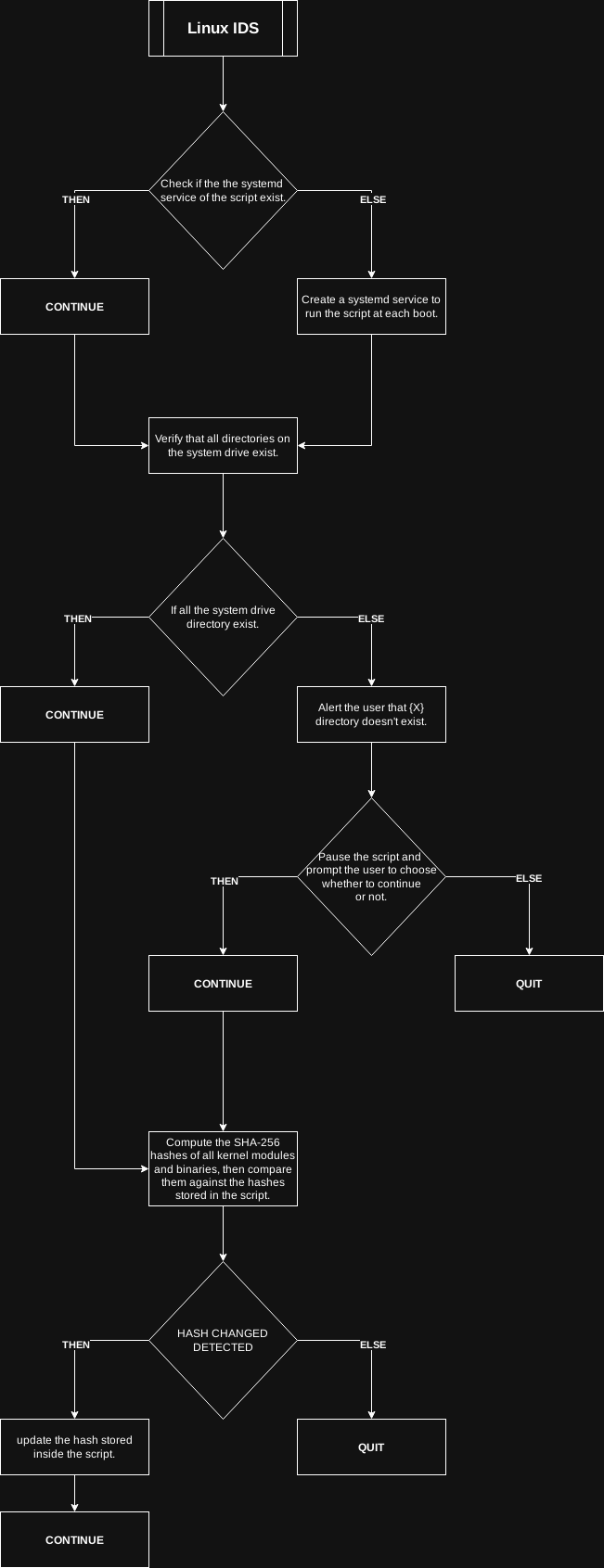
When you execute the script for the first time, it creates a dedicated systemd service that is enabled to start at every boot. During this initial run, the script scans the kernel modules and executable binaries, calculating their SHA256 hashes, and embeds those hashes directly within the script. This snapshot serves as a trusted baseline for future comparisons.
On each boot up of the operating system, the systemd service automatically invokes the script. It recomputes the SHA256 hash of every monitored file and compares the result against the stored baseline. If a mismatch is detected, the script flags the altered file, indicating a possible tampering event. Additionally, the script detects newly added binaries or kernel modules that were not part of the original baseline, alerting you to unexpected additions.
Workflow
Setup
-
Download the script
GetBack[/OpSec]$ git config --global http.proxy socks5h://localhost:9050 GetBack[/OpSec]$ git config --global https.proxy socks5h://localhost:9050 GetBack[/OpSec]$ git clone http://gdatura24gtdy23lxd7ht3xzx6mi7mdlkabpvuefhrjn4t5jduviw5ad.onion/GetBack/opsec-blogposts/src/branch/main/intrusion-detection-system_linux/ids-linux.py GetBack[/OpSec]$ sudo mv ids-linux.py /root/ -
On its initial run, the script generates a systemd service that starts on every boot. The service scans kernel modules and binary files, computes their SHA256 hashes, and records all of those hashes within the script for future integrity checks.
GetBack[/OpSec]$ sudo python3 /root/ids-linux.py
[*]Creating Linux IDS service.
Created symlink '/etc/systemd/system/multi-user.target.wants/ids-linux.service' → '/etc/systemd/system/ids-linux.service'.
[*] STARTING TO CHECK THE SYSTEM DRIVE DIRECTORY
[*] The system drive directory '/bin' exists.
[*] The system drive directory '/boot' exists.
[*] The system drive directory '/dev' exists.
[*] The system drive directory '/etc' exists.
[*] The system drive directory '/home' exists.
[*] The system drive directory '/lib' exists.
[*] The system drive directory '/lib64' exists.
[*] The system drive directory '/lost+found' exists.
[*] The system drive directory '/media' exists.
[*] The system drive directory '/mnt' exists.
[*] The system drive directory '/opt' exists.
[*] The system drive directory '/proc' exists.
[*] The system drive directory '/root' exists.
[*] The system drive directory '/run' exists.
[*] The system drive directory '/sbin' exists.
[*] The system drive directory '/srv' exists.
[*] The system drive directory '/sys' exists.
[*] The system drive directory '/tmp' exists.
[*] The system drive directory '/usr' exists.
[*] The system drive directory '/var' exists.
Scanned 6465 files
- Ensure the systemd service of the script it is enabled correctly:
GetBack[/OpSec]$ sudo systemctl status ids-linux.service
○ ids-linux.service - Start
     Loaded: loaded (/etc/systemd/system/ids-linux.service; enabled; preset: enabled)
     Active: inactive (dead)
- If you want to use the script manually you can just run the script.
GetBack[/OpSec]$ sudo python3 /root/ids-linux.py
[*]Linux IDS service exists.
[*] STARTING TO CHECK THE SYSTEM DRIVE DIRECTORY
[*] The system drive directory '/bin' exists.
[*] The system drive directory '/boot' exists.
[*] The system drive directory '/dev' exists.
[*] The system drive directory '/etc' exists.
[*] The system drive directory '/home' exists.
[*] The system drive directory '/lib' exists.
[*] The system drive directory '/lib64' exists.
[*] The system drive directory '/lost+found' exists.
[*] The system drive directory '/media' exists.
[*] The system drive directory '/mnt' exists.
[*] The system drive directory '/opt' exists.
[*] The system drive directory '/proc' exists.
[*] The system drive directory '/root' exists.
[*] The system drive directory '/run' exists.
[*] The system drive directory '/sbin' exists.
[*] The system drive directory '/srv' exists.
[*] The system drive directory '/sys' exists.
[*] The system drive directory '/tmp' exists.
[*] The system drive directory '/usr' exists.
[*] The system drive directory '/var' exists.
Scanned 6465 files
SYSTEM CLEAN
NO FILE TAMPERED DETECTED
Showcase
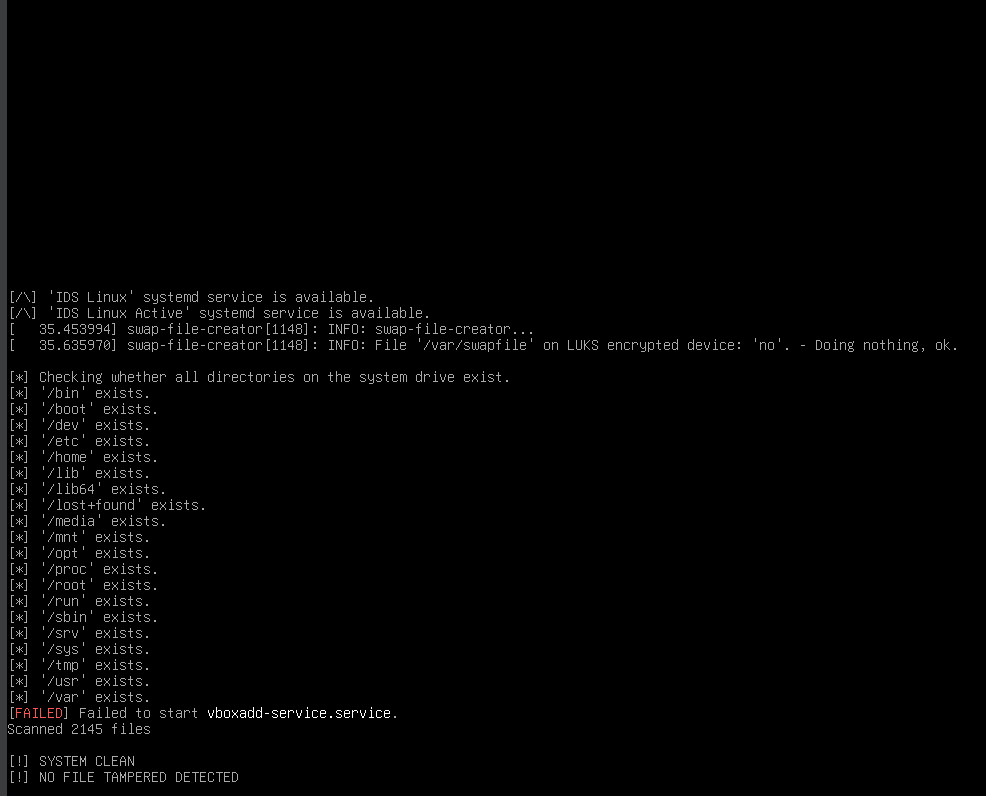
On its first execution, the script creates a systemd service that schedules the script to run every 4 hours and also triggers it on every system boot. This demonstration showcases the script’s normal‑run behavior during the system boot:
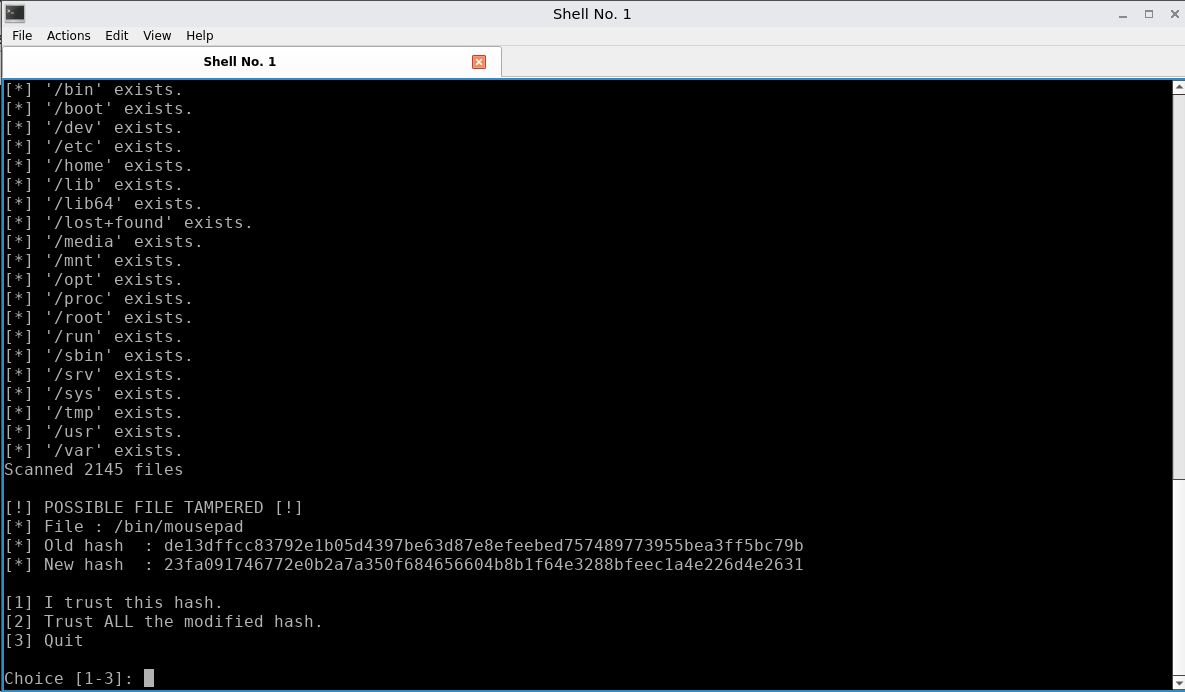
The script that runs and detects different hashes:
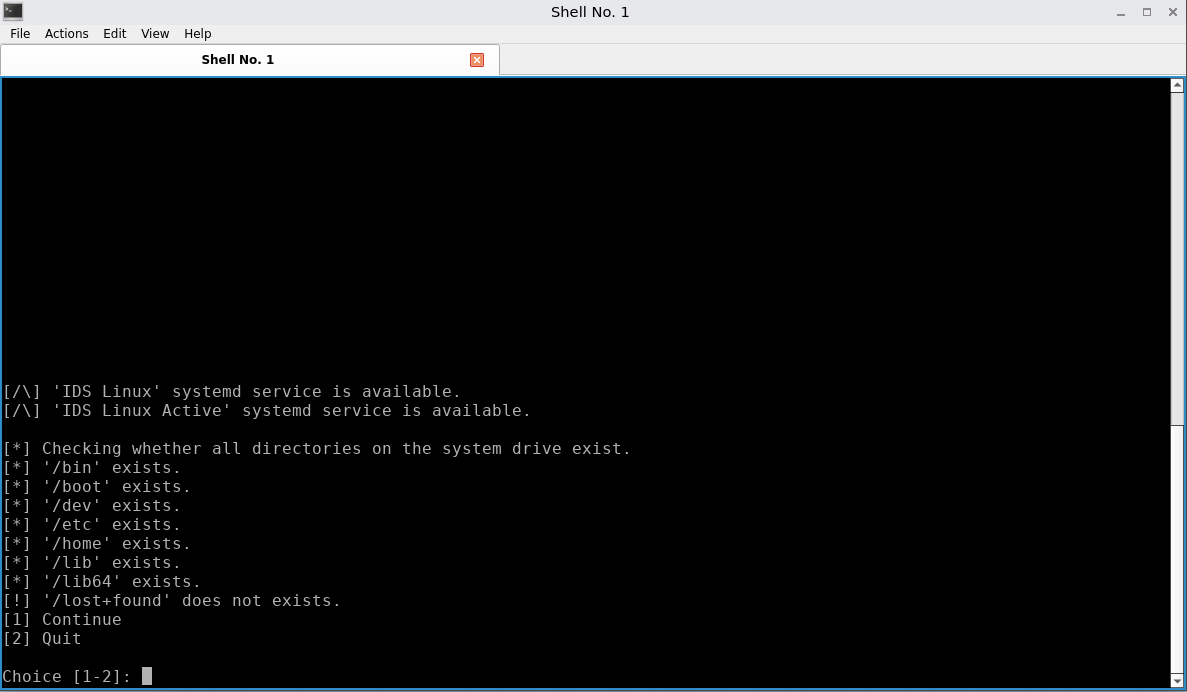
The script that runs and detects that some of the system drive directory doesn't exist:
Conclusion
The script helps detect tampered files or altered kernel modules that you might otherwise miss. However, like any solution, it isn't foolproof: if an attacker gains root access, they could modify the script to add the hash of a malicious kernel module, allowing the rogue code to run undetected. Therefore, minimizing root level usage and privileges remains essential.
 Suggest changes
 GetBack
 01-12-2025
 Donate XMR to the author:
82v7UfCYcHALkS7zTUheA8KHivCKRjztqAYf3fhtQTGFZhcZksi1dNH1rwgqCZGDSQ371Rv51RrTv2CTogQ9X2Ef3XPEeHW